
img_01: flat look of s-log3 (hover mouse to see color)
everyone wants that juicy color grade, but rarely anyone learns the right way in achieving such natural exposures. this guide will help you with that.
01. what is s-log3 ?
s is short for 'sony' and log is short for 'logarithmic' and 3 is the version. put together, s-log3 is a picture profile developed by Sony that makes footage look flat and gray on purpose, but captures more color and detail, allowing for better color grading. they do so by recording the brightness using the 'logarithmic scale,' hence the name 'log'.
02. what the hell is 'proper exposure' ?
when it comes to videography, 'proper exposure' means protecting the highlights (i.e., not blowing off the brightest parts) and keeping the noise low. s-log3 naturally compresses highlights and lifts the shadows, therefore one must expose it brighter than normal and bring the overall exposure down in grading.
03. base iso
base iso is defined as the lowest native sensitivity setting on a camera. the base iso is where noise is reduced to the minimum. as a rule of thumb, we should always shoot in base iso. some cameras nowadays can have up to 2 base isos.
04. purpose of nd
nd filters are useful predominantly in videography as it helps one keep the 'cinematic look' duing daytime while also enabling the aperature to be low. usually in day times, the outdoors get bright enough such that lowering the iso more can't be achieved. Increasing the shutter speed also isn't an option due to the 'unnatural' feeling it gives off when the shutter speed is high. As such, an nd filter acts as another method of controlling light into your camera. Think of it as a pair of sunglasses for your camera.
05. ettr (expose to the right)
this is the golden rule when it comes to exposing s-log3. given that s-log3 hates underexposure due to the shadows being heavily compressed and the noise being apparent when a lift is done in post-production, the standard professional practice exposes s-log3 at +1 to +2 stops. the 'stops' can be seen through the circled portion of the image.
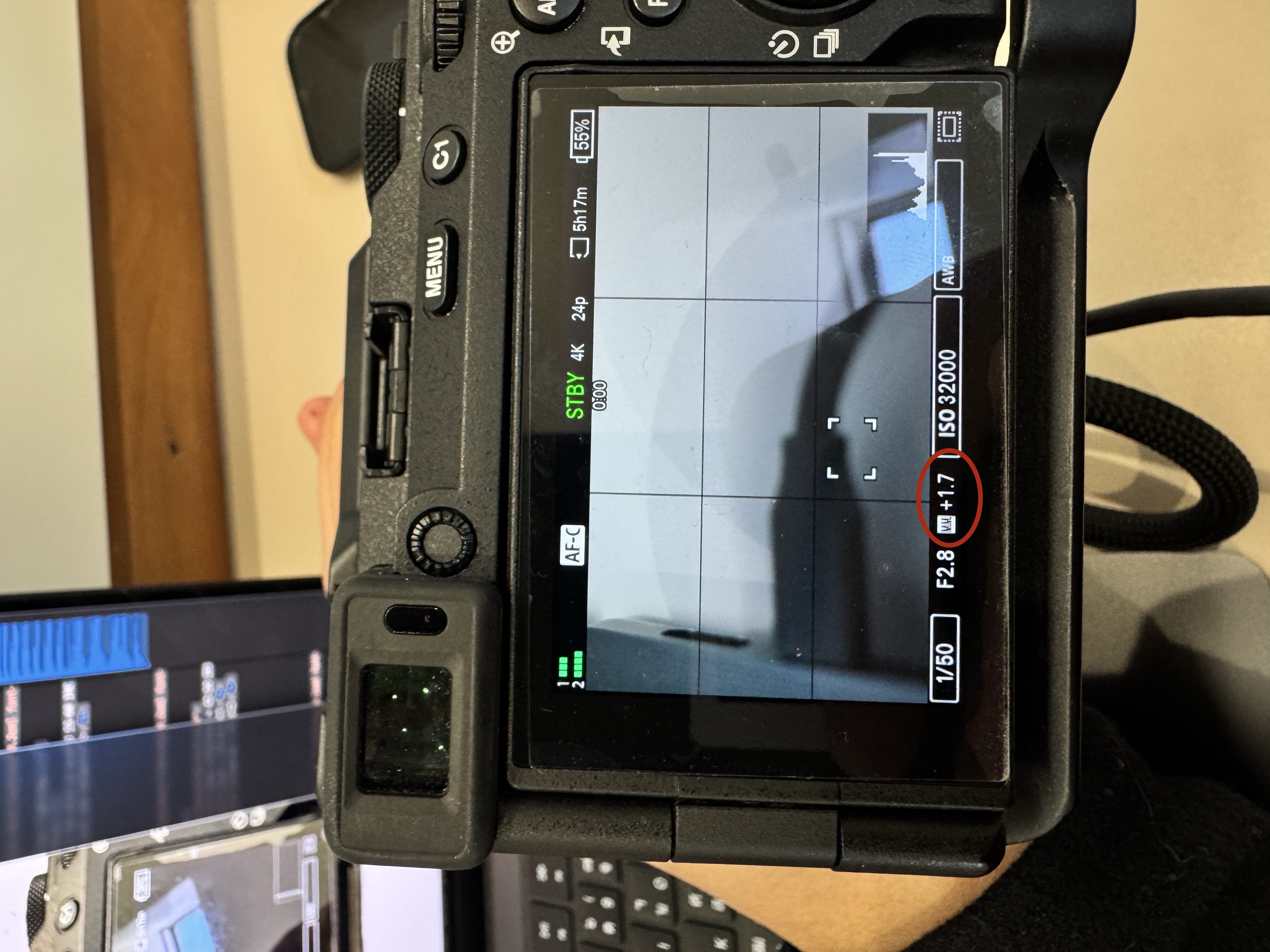
img_02: image shows the frame being +1.7 stops overexposed
06. 3 reliable methods to expose s-log3
// METHOD_01: WAVEFORM MONITOR (BEST)
- place subject in final lighting.
- check face on waveform
- push exposure until the skin is around 55-60 IRE and nothing important surpasses or hits 95 IRE
- lock the exposure with and nd/aperture
// METHOD_02: FALSE COLOR (FAST AND ACCURATE)
- set false color to:
- grey reference ~ 45-50 IRE
- skin ~ 55-65 IRE
- clipping ~ 95 IRE
// METHOD_03: ZEBRAS (IF NOTHING ELSE)
- set zebras to:
- 70 IRE for skin
- 95+ IRE for clipping warning
- procedure:
- expose until skin just starts triggering 70 zebra
- ensure important highlights you want to keep don't exceed 95